Sealless Pumps for a Safer and Greener World

Choosing Printing Equipment in 2026 requires more than comparing catalog prices and impressive production speeds. Global buyers must connect equipment performance with real workplace demands, product materials, labor skills, and delivery schedules. A label printer running beside a packaging line faces different pressures than a commercial press serving short-run marketing orders. Paper dust, humidity, ink storage, and operator training can change daily results.
This guide examines practical buying decisions through production capacity, print quality, automation, energy use, maintenance, and total ownership cost. A machine rated for 10,000 sheets per hour may deliver less in a busy facility with frequent format changes. Ask for verified samples, not attractive brochures. Review sample details, registration accuracy, drying time, noise levels, and waste during setup. These small observations often reveal more than a headline specification.
Supplier reliability also matters. Check service coverage, spare-parts availability, warranty terms, software support, and installation training before signing an agreement. Regional voltage standards, import requirements, workplace safety rules, and environmental expectations deserve careful review. Independent test reports and references from comparable users can strengthen purchasing confidence. However, no buying guide is flawless. Real factories surprise us. Forecasts can be wrong, and new technology may create unfamiliar training costs. A responsible buyer leaves room for testing, staged investment, and honest reassessment. The strongest decision balances measurable output with dependable support, practical experience, and long-term business resilience.
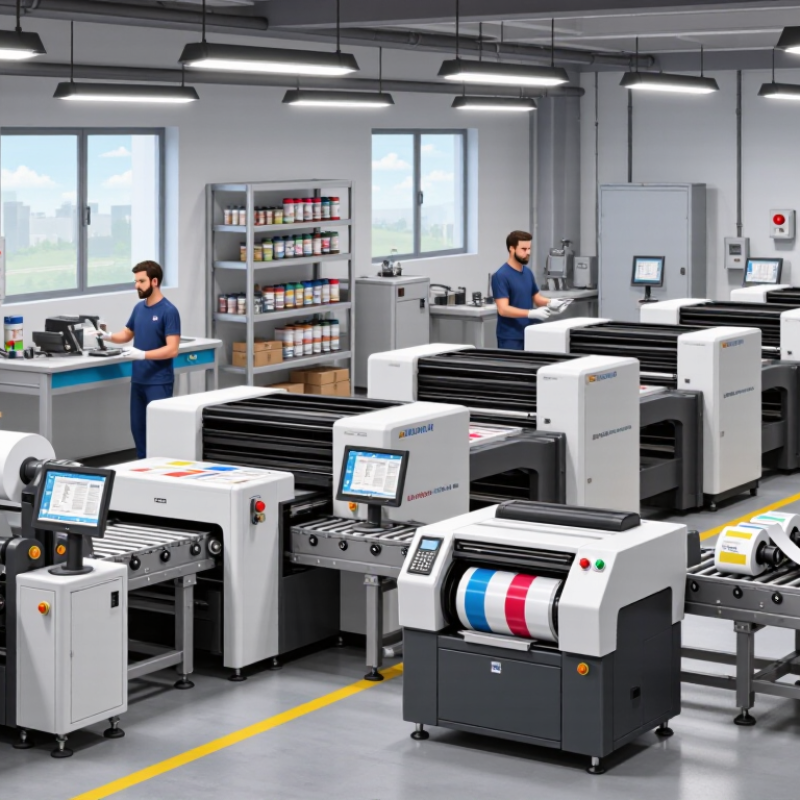
Printing equipment serves different stages of production, and each category solves a specific operational need.
Prepress systems prepare files, manage color, and create accurate plates or digital data.
Digital presses handle short runs, variable content, and quick job changes.
Offset presses remain suitable for stable, high-volume production with consistent color.
Flexographic equipment supports labels, packaging films, and other flexible materials.
Wide-format printers produce large graphics, signage, and display materials. Finishing machines cut, fold, bind, laminate, or crease printed sheets.
Their core function is practical: converting printed output into a usable product.
In procurement reviews, I examine substrate compatibility, hourly output, setup time, and operator access. A machine can look impressive but perform poorly with local materials.
Tips:
Request sample tests using your real files and substrates. Measure power needs, floor space, ventilation, and maintenance access before purchase.
Ask for training details, spare-part availability, and service response times. Total cost is not only the invoice.
Ink, plates, blades, waste, and downtime can change the calculation. I have seen buyers prioritize speed and later regret complicated controls.
That mistake is worth questioning. A simpler machine may deliver better reliability when operators are still developing technical skills.
Record test results carefully, including color consistency, registration accuracy, noise, and cleaning time. Clear evidence supports safer decisions across different markets.
2026 Top Printing Equipment Buying Guide for Global Buyers
Before comparing printing equipment, define the real production day. Rated speed can mislead when jobs include setup, color changes, drying, and cleaning. Smithers’ The Future of Digital Print to 2029 projects continued growth in digital print value, driven by shorter runs and variable content. That trend makes usable throughput more important than headline speed. Ask suppliers for output at your common media weight, not only laboratory conditions.
Check resolution, color stability, and substrate flexibility together. A high dpi figure cannot rescue weak registration or uneven solids. Request test sheets using coated stock, recycled paper, labels, and heavier board. Measure first-page time, warm-up time, waste sheets, and average uptime. Good evidence beats attractive claims. Also review the duty cycle against your monthly peak, not your average month. Undersizing equipment is expensive.
Software deserves equal attention. Confirm workflow compatibility, color-management tools, automation, data security, and operator training. Energy use matters too. ENERGY STAR product data and ISO 12647 color standards can support more consistent comparisons, although certification does not guarantee productivity. Calculate total cost per sellable sheet, including consumables, maintenance, labor, rejected output, and power. The first spreadsheet is rarely perfect. Recheck assumptions after a live demonstration, because a machine that looks fast may become slow under real workload.
| Equipment Type | Typical Production Speed | Maximum Printable Format | Typical Resolution | Common Substrate Range | Best-Fit Applications | Setup and Changeover | Key Purchasing Consideration |
|---|---|---|---|---|---|---|---|
| Sheet-Fed Offset Press | Approximately 10,000–18,000 sheets/hour | Commonly 520 × 740 mm to 750 × 1,060 mm | Typically equivalent to 2,400–3,000 dpi imaging capability | About 40–600 gsm, depending on press configuration and stock type | High-volume commercial printing, books, magazines, packaging cartons and marketing materials | Longer setup; plate preparation, makeready and color adjustment are required | Best unit cost at longer runs; compare color control, drying system, automation and waste during makeready |
| Cut-Sheet Digital Toner Press | Approximately 60–150 A4 pages/minute, depending on color mode and media | Usually up to SRA3 or approximately 330 × 488 mm; some configurations support larger sheets | Commonly 1,200 × 1,200 dpi or comparable effective output | About 52–400 gsm, with limitations varying by coated, textured and synthetic media | Short-run commercial work, variable data, personalized documents, photo books and on-demand production | Very short setup; no plates and fast job changeover | Compare monthly duty cycle, media flexibility, click charges, inline finishing and color consistency |
| Continuous-Fed Production Inkjet | Approximately 75–200 m/minute, depending on print mode and paper type | Web widths commonly 430–560 mm | Typically 600 × 600 dpi to 1,200 × 1,200 dpi | Commonly optimized for uncoated and inkjet-treated papers from about 40–160 gsm | Direct mail, transactional documents, books, newspapers and high-volume variable-content work | Fast digital changeover; paper conditioning and drying settings may be required | Evaluate ink compatibility, drying capacity, paper cost, uptime and finishing-line integration |
| Sheet-Fed Production Inkjet | Approximately 3,000–6,000 B2 sheets/hour in production modes | Commonly B2 format, approximately 500 × 700 mm; some systems support larger sheets | Typically 600 × 600 dpi to 1,200 × 1,200 dpi | Approximately 60–450 gsm, depending on ink, primer and drying technology | Short-to-medium-run commercial printing, premium direct mail, catalogs and personalized marketing | Minimal plate setup; media profiling and ink-drying calibration are important | Compare color gamut, drying method, paper qualification list, productivity at high coverage and ink cost |
| Narrow-Web Flexographic Press | Approximately 100–300 m/minute | Typical web width of 250–600 mm | Print resolution depends on plate and anilox configuration; fine text and process color capability are common | Films, paper, label stock and lightweight coated materials, commonly about 12–250 microns or gsm equivalent | Labels, flexible packaging, small-format film packaging and self-adhesive materials | Moderate setup; plates, anilox rolls, inks and registration require preparation | Compare register control, substrate tension, curing or drying, ink system and inline inspection |
| Wide-Format Eco-Solvent Printer | Approximately 15–45 m²/hour in production-quality modes | Common roll widths of 1.37–3.20 m | Typically 720–1,440 dpi, depending on print mode | Self-adhesive vinyl, banner film, coated fabrics, wallpaper and other flexible media | Indoor and outdoor signs, vehicle graphics, retail displays and promotional graphics | Low mechanical setup; media profiling, drying time and lamination may be required | Compare outdoor durability, odor and ventilation requirements, ink consumption and take-up reliability |
| Wide-Format UV or UV-LED Printer | Approximately 20–100 m²/hour, depending on resolution, passes and ink coverage | Common flatbed sizes range from 1.25 × 2.50 m to 2.50 × 3.08 m; hybrid roll options are available | Typically 600–1,200 dpi | Rigid boards, plastics, glass, metal sheets, wood, acrylic and flexible roll media | Point-of-sale displays, rigid signage, décor panels, packaging prototypes and industrial graphics | Fast curing and short changeover; surface cleaning and material adhesion testing are important | Check flatness tolerance, white and clear ink options, UV-LED energy use, adhesion and bed loading method |
| Sublimation Transfer Printer | Approximately 20–100 m²/hour, depending on width and quality mode | Common roll widths of 1.6–3.2 m | Typically 600–1,200 dpi | Transfer paper and polyester fabrics or polymer-coated rigid materials | Sportswear, soft signage, flags, home textiles and customized polyester products | Printing is followed by heat transfer using a calendar or heat press | Compare transfer efficiency, color management, fabric compatibility, heating capacity and ventilation |
| Industrial Screen Printing Line | Approximately 300–1,500 pieces/hour, depending on product size and curing process | Often supports flat sheets or parts from small format up to approximately 1.5 × 3.0 m | Stencil-based output; effective detail commonly suited to fine text, solid colors and specialty effects | Paperboard, plastics, glass, metal, textiles, wood and other prepared surfaces | Industrial panels, specialty packaging, textiles, glass decoration and high-opacity graphics | Slower setup; screens, squeegees, inks and registration require preparation | Compare curing technology, ink adhesion, screen durability, automation level and cleaning requirements |
| Digital Label Press | Approximately 20–80 m/minute, depending on toner or inkjet technology and finishing | Common web widths of 210–430 mm | Typically 600–1,200 dpi | Paper, film, synthetic label stock and pressure-sensitive materials, often about 50–250 microns | Short-run labels, versioned packaging, variable data and rapid product launches | Fast job changeover; substrate profiles and finishing setup are still required | Compare inline white ink, varnish, inspection, die-cutting, waste matrix removal and color repeatability |
| Digital Packaging Press | Approximately 30–100 m/minute for web systems or 2,000–6,000 sheets/hour for sheet systems | Commonly B2 to B1 sheet sizes or web widths of approximately 500–750 mm | Typically 600–1,200 dpi | Paperboard, coated board, selected films and synthetic packaging materials | Folding cartons, flexible packaging, short-run boxes, samples and versioned packaging | Fast changeover compared with conventional analog processes | Verify food-contact suitability where applicable, ink migration controls, board feeding and finishing compatibility |
| Post-Press Finishing System | Approximately 1,000–6,000 sheets/hour or 10–100 m/minute, depending on operation | Usually matched to the connected press format; common ranges include SRA3, B2 and B1 | Not applicable as a printing resolution; registration is commonly controlled in the sub-millimeter range | Paper, board, laminated sheets, synthetic sheets and digitally printed media | Cutting, creasing, folding, stitching, perfect binding, laminating and die-cutting | Setup depends on tooling, job size and finishing sequence | Compare automation, barcode or camera registration, tooling cost, waste handling and integration with existing equipment |
| High-Speed Cutting and Digital Finishing Table | Approximately 20–100 m²/hour, depending on routing, creasing, cutting and material thickness | Common working areas from approximately 1.6 × 2.5 m to 3.2 × 2.0 m | Cutting accuracy commonly around ±0.5–1.0 mm under suitable operating conditions | Corrugated board, foam board, PVC sheet, acrylic, honeycomb board, textiles and flexible media | Short-run packaging, prototypes, displays, signage and custom-shaped products | Tool changes are generally quick; file preparation and material calibration are required | Compare tool stations, vacuum hold-down, camera registration, software workflow and maximum material thickness |
| Print-and-Apply or Industrial Coding System | Approximately 30–200 m/minute or 20–150 packages/minute, depending on application | Character and label size depend on printhead, applicator and package geometry | Commonly 300–600 dpi for variable text, codes and barcodes | Corrugated cases, cartons, flexible packaging, labels, bottles and industrial components | Batch coding, traceability, barcodes, logistics labels and product identification | Fast changeover; requires product, code and database verification | Compare code readability, data connectivity, sensor response, ink or label consumption and compliance features |
| Large-Format Flatbed Scanner and Proofing System | Approximately 10–60 m²/hour, depending on scan mode, color accuracy and proofing workflow | Common flatbed areas from A2 through approximately 1.6 × 2.5 m | Optical scanning commonly 600–2,400 dpi; proofing output depends on the printer | Paper, artwork, textiles, boards, photographs, packaging mockups and flat samples | Color proofing, artwork archiving, packaging verification and quality inspection | Low mechanical setup; calibration and color profiling are essential | Compare color measurement tools, ICC workflow, scan uniformity, software compatibility and calibration frequency |
| Cross-Category Buying Checks for Global Buyers | |||||||
| Total Cost of Ownership | Calculate equipment price, installation, operator labor, electricity, consumables, service contracts, replacement parts, software, waste and financing over a three-to-five-year period. | ||||||
| Utilities and Site Requirements | Confirm electrical voltage and frequency, peak power, compressed air, ventilation, temperature, humidity, floor loading, door clearance and required safety systems before ordering. | ||||||
| Workflow and Connectivity | Check PDF and color-management support, job-ticket standards, variable-data capability, MIS or ERP connectivity, barcode support, cloud security and operator access controls. | ||||||
| Service and Spare Parts | Request documented response times, preventive-maintenance intervals, remote-support capability, local technician coverage, critical spare-parts availability and training requirements. | ||||||
| Quality and Compliance | Verify repeatability, color measurement, substrate approvals, curing or drying performance, emissions, recycling requirements and applicable electrical or product-safety certifications for the destination market. | ||||||
2026 Top Printing Equipment Buying Guide for Global Buyers
How to Match Equipment With Printing Requirements
Selecting printing equipment should begin with the finished product, not the machine catalogue. Define substrate type, sheet or roll dimensions, ink coverage, color expectations, and monthly volume. A packaging line may need accurate registration and strong drying. A short-run commercial shop may value quick setup more than maximum speed. Match each specification to a measurable production need.
Ask suppliers for test samples using your actual material. Observe feeding stability, drying time, color consistency, and waste during changeovers. Record results under realistic conditions, including humid mornings and mixed job sizes. A machine rated for 10,000 sheets per hour may perform differently with heavy stock or dense coverage. Speed alone can hide costly interruptions.
Calculate the full operating cost. Include energy, consumables, maintenance access, operator training, software updates, and replacement parts. Check electrical requirements and local safety documentation before installation. Regional service response also matters, especially when production deadlines are tight. No calculation is perfect. Recheck the assumptions after a trial run. A spreadsheet may look convincing while ignoring setup waste or operator workload. The best match is not always the newest or fastest machine. It is the equipment that delivers repeatable quality within your actual workflow.
A reliable supplier should provide more than a competitive quotation. Ask for factory audit records, production capacity, export experience, and references from similar markets. Request a live equipment demonstration, not only edited videos. Watch the machine handle your actual paper, substrate, speed, and color requirements. Small details matter, such as cable labeling, access-panel design, and cleaning time.
Compliance documents must match the exact model and configuration. Check electrical safety reports, operating manuals, risk assessments, and applicable regional certifications. Confirm voltage, frequency, plug standards, noise limits, and installation requirements before signing. Do not accept generic certificates. They may describe an older machine. Local rules can also affect inks, ventilation, waste handling, and workplace safety. Have an independent technical adviser review uncertain documents.
After-sales support often decides whether production remains stable. Require written response times, remote diagnosis procedures, spare-parts availability, and technician travel terms. Clarify training hours and whether installation includes calibration. A useful supplier can explain preventive maintenance with practical schedules, not vague promises. Keep critical parts identified by serial number and expected delivery time. The cheapest offer may become costly after one missed production week. That risk is easy to underestimate. Buyers should also record every promise in the contract. Verbal confidence is not a service plan.
Global buyers often focus on the purchase price. A lower quote can hide freight, duties, software, training, and installation fees. Build a total-cost worksheet before approving the order. Include site preparation, electrical upgrades, ventilation, and operator training. Request a three-year estimate for energy, consumables, maintenance, and spare parts. Keep a contingency fund. Unexpected costs are common.
Installation requires more than enough floor space. Check voltage, humidity, ventilation, access routes, and foundation strength. Measure doors and elevators before shipment. A qualified technician should verify alignment and safety systems. Schedule production trials after installation. These trials can reveal feeding errors, color variation, or slow changeovers.
No forecast is perfect.
Long-term expenses deserve monthly attention. Track consumable yield, power use, maintenance hours, and unplanned downtime. Keep critical replacement parts available, especially when local support is limited. Ask service providers about response times, remote diagnosis, and technician coverage in your region. I have seen buyers underestimate training costs and operator turnover. That assumption may fail quickly. A lower-output system can sometimes deliver better value when it reduces waste, repairs, and staff stress. Review actual operating data after ninety days, then adjust the budget instead of defending the original estimate.


